• 0 Posts
  • 14 Comments
Joined 3 years ago
cake
Cake day: June 13th, 2023

help-circle


  • Technically true, BUT.

    PocketID does offer a fallback to a numeric code for clients that don’t support passkeys (e.g. most embedded webviews on mobile).

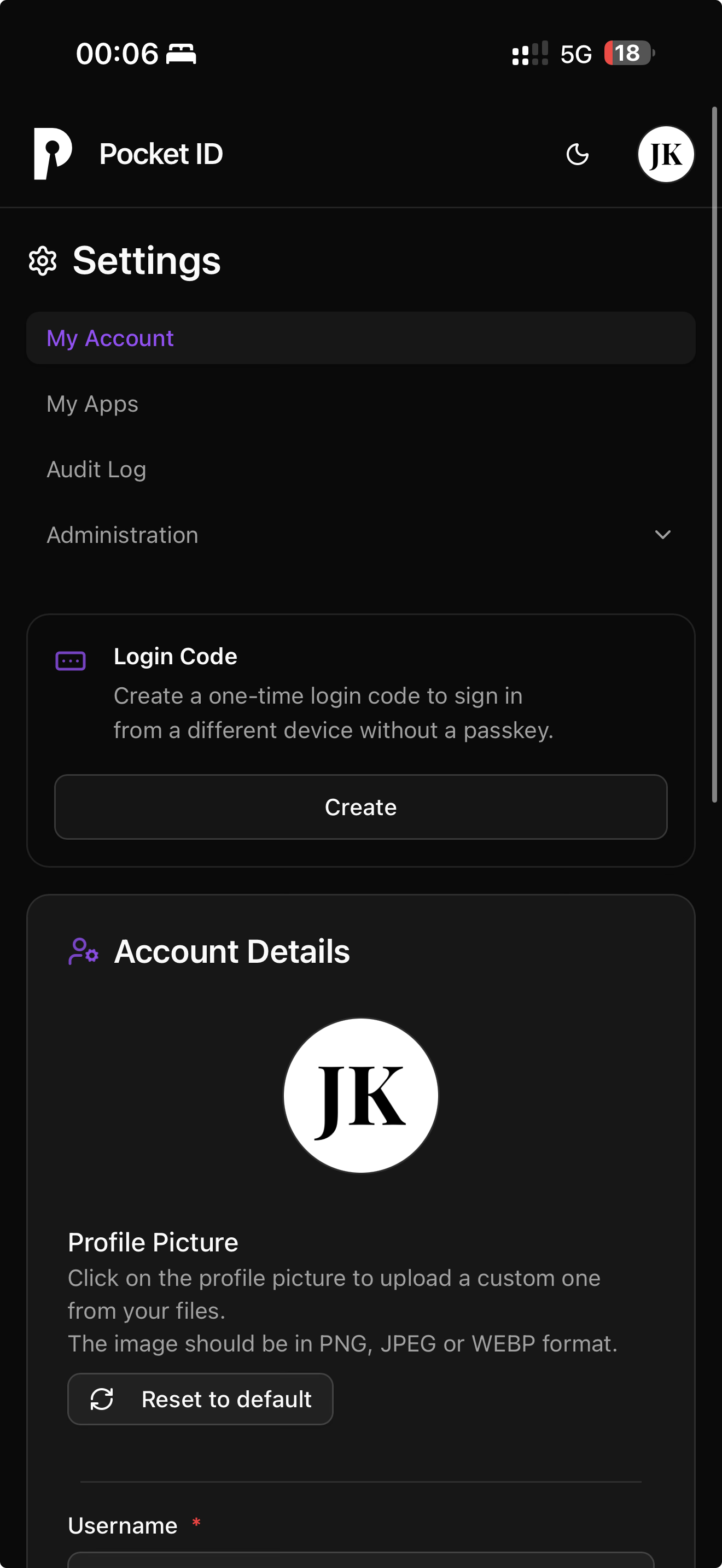
    For those, you simply need to navigate to the PocketID interface (for less technically adept people you can put it on the home screen on their phones), and click the big center button “Create” in the “Login Code” section (see attached screenshot).

    Unfortunately these login codes are long lived (10-15 minute I believe?) and aren’t OTP compatible so you can’t just register it in a code provider to use whenever needed.


  • Yes and no. You need to understand that no home service truly replaces Netflix, for a few reasons (the media might not be available on any of the services you’re using, for example).

    It’s also not as simple as searching for a media in Jellyfin/Plex (or whatever other media frontend you choose, like Emby). There’s a fixed flow.

    But let’s start by explaining the layers:

    1. The frontend - Plex/Jellyfin/Emby/Kodi. This is what your users see, aka the “Netflix experience” - open the app, and all the media available on your storage device will be shown. Then they can click one and play it.

    2. The request manager - Seerr (previously Overseerr/Jellyseerr). This is a separate interface where your users can request media. You still need to manually accept it (unless you set it up to automate things fully, but make sure you trust your users!). If something isn’t available, your users will come here and ask for it, then the manager will show the status (requested, accepted, downloading, available). Once available, your users can watch it through the frontend.

    3. The media managers - Radarr/Sonarr/Lidarr/etc. This is the software responsible for keeping a list of media you want, regularly looking them up on torrent trackers, Usenet servers, etc., and matching your requirements (resolution, language, encoding, file size, and so on), then grabbing the release and passing it on to the download client.

    When you accept a request in the request manager, it passes on the info to the media manager, which adds the requested media to its internal list and begins looking for it.

    1. Download client - torrent/Usenet downloader (qBittorrent, sabnzbd, etc.) pretty straightforward, this thing takes an incoming download request from the media manager, and downloads the file according to protocol, then signals the manager that the download is ready.

    At this point, control is passed back onto the media manager, which finds the freshly downloaded file, copies/moves it to the right place according to settings, renames it according to settings, marks it done then sends a signal to the request manager to indicate the request was fulfilled.

    Finally, the media frontend, which is set up to watch the folder where the new media items are copied/moved and renamed, gets a notification that a new file is available, scans it, prepares metadata (poster, background image/music, description, actor and production lists, ratings, etc.), and makes it available in the search interface.


    So the key differences with Netflix are:

    • limited content compared to Netflix
    • the ability to request new media
    • no CDNs, so if you have lots of users and not much bandwidth/processing power (latter in case of transcoding), your users will struggle. A standard home server and internet connection can serve 3-4 users at the same time.
    • limited language support. since these are pirated media, and most pirated media has at most 2-3 audio tracks, you’ll lose that Netflix perk of having 6-8-10 audio tracks available. subtitles can be supplemented though (audio tracks too but they rarely match perfectly to the video so it’s not as simple as downloading a file and call it a day).

    That about covers all the functional differences between an arr stack and Netflix.


  • I wish Prowlarr supported having a pool of generic indexers that are regularly speed tested and only the top X are used for actual queries (one random query an hour to check response time shouldn’t hurt, and external searches can also provide for this statistic), either based on count/percentage or maximum response time.

    That would alleviate the long queries on a very dynamic approach.


  • As for which project to use… The issue with book management is that it’s exponentially more complex than other media due to the number of dimensions a book can be on.

    Author metadata alone can be problematic - some books are published under different names in different countries, some books are co-authored but published under all variations of the possible combinations (author 1 or author 2 or both, and that’s if there’s only two authors).

    Language as a dimension usually means the same book is actually a different variant. This also applies for series info.

    Then there’s the issue of metadata quality. Unlike with TV shows and movies, where either IMDb or TheTVDb etc. can be used because generally all of these potential sources are good quality… books don’t really have a central database, because unlike with the aforementioned, language as a dimension does affect the release, and can’t be easily treated as the same entity as different language publications will have different IDs… So if you have a database of US books, that won’t apply to anywhere else in the world. Of course GoodReads and HardCover are trying to fix this but you’re still running into issues like API usage limits etc.

    Overall, making a book download and management system akin to the rest of the Arr Suite is a major, major undertaking that requires major discussions not just within the project but also spanning external services to come to an agreement on which approach is best.


  • I actually have different problems with Chaptarr aside from it being vibe coded.

    Generally, I don’t have an issue with vibe coding - as long as it’s not the average person’s Star Trek level depiction of asking the computer an overly simplified request which it then successfully extrapolates into a fully working solution. AI aided development isn’t an issue really as long as the developer knows what they want to achieve and HOW to do it, and utilising AI to do the heavy lifting.

    No, my problem with Chaptarr is the general approach of the maintainer. It’s a fork of Readarr (clearly visible from the logs), which was licenced under GPLv3, which in turn requires any forks (derivatives) to publish source code. Now, RLH has been providing Docker images only, claiming “the code is too messy to publish” whenever asked, meaning there’s absolutely no oversight as to what is actually happening inside, what’s been modified and so on.

    Furthermore he modified the metadata server format, without publishing it, then created two separate APIs for it, which you have to manually edit after install (and this is hidden in the FAQs on Discord), that metadata server is incredibly limited (because it’s supposed to be for “testing only”), and there’s no option to use your own either, as the API contract has changed.

    RLH is also pretty opaque about updates, sometimes you get a flurry of updates within a few hours, sometimes you’re sitting around for weeks without any changes being pushed. He’s also been pretty shady, randomly making the DockerHub images available to anyone then restricting it, and I’ve also heard about random bans of people on Discord who dared to question him (although this is only hearsay, I have not witnessed any bans myself, so take this with a pinch of salt).

    Overall the whole project is super shady and even if I presume the best intentions, the continued GPL licence violation with various quality issue excuses alone is enough for me to stay far away from it - even if I appreciate some of the QoL changes I’ve seen when I trialled it.


  • Portability is not really an aspect one needs to consider when it comes to a NAS. Performance hits? Z1 will have performance issues when running in a simple mirror (especially for writes), but with 4+ disks that reduces significantly.

    Sure scrubs will take longer on a multi-disk array, but again for a home NAS, the goal is maximising data storage capacity without a major hit on performance, ideally being able to saturate the most common gigabit LAN connection and have some more bandwidth available for local processing.


  • You’re incredibly wrong on your assumptions here.

    First of all, ZFS (the file system TrueNAS specialises for) is best used with at least 3-4 disks. The more the better. A dual disk setup for ZFS (or any other kind of RAID) is super wasteful.

    Second, no, 4TB won’t be enough. You think it is today, but soon you’ll be downloading media Linux ISOs and quickly realise that even 16TB is a stretch within a year.

    My recommendation would be going for at least 4x 4TB, but 3-4x 6TB or even 8TB would be probably preferred. And similarly, I’d rather overshoot the initial purchase rather than realise 6-8 months in that oops, the 2-4 disk system you got isn’t enough… Even if you don’t fill the bays, I’d recommend you go for at least a 4 bay system, but rather, for 6. Sadly, SOHO NASes aren’t designed with easy expandability down the line.