

2·
3 months agoThe wall mount rack is a used ACP Netshelter. I was able to find it on Craigslist a few years ago. The rackmount face plates are custom 3d printed but unfinished as I abandoned the project due to life.

The wall mount rack is a used ACP Netshelter. I was able to find it on Craigslist a few years ago. The rackmount face plates are custom 3d printed but unfinished as I abandoned the project due to life.
I may, it was a massive work in progress that I never finished because life decided to beat the crap out of me for the last 3 years. I was trying to build a modular system that was 19" and 10" rack compatible and would have storage options as well. In this case its 2x Seagate external drives, and a WD external drive plugged in via USB3 and setup in a CEPH cluster.
Yes thats the MS-A1 which is a great little box but not as flexible as the MS-01. It lacks the PCIe slot, and only has 2x 2.5g Ethernet ports.
You probably wont find the MS-01 used since its not like the Lenovo’s with their mass market deployment as office PCs.
As for price, https://www.aliexpress.us/item/3256810143174659.html? I was looking at the barebones since the prices on DDR5 and NVME’s are nuts right now. I have spare NVME drives so all I would need is RAM and I can find it cheaper than the resellers who mark it up when they install it for you.
I have 2 of them with older 6 core CPUs and 32gb each. I also added a 10g SFP card in the PCIe slot so they would have a bit more umph.


For 380 each I would not bother, and I would look at the Minisforum MS-01 as it has built in dual 10g SFPs and dual 2.5g RJ45’s plus a PCIe slot.
https://minisforumpc.eu/products/ms-01?_pos=1&_psq=MS&_ss=e&_v=1.0
at ~80 euro’s more you get more CPU, faster ram if you can find it, more storage, and more networking.
zimablade or zimaboard easy setup and casaos or zimaos make selfhosting easy with preconfigured apps/containers mine is an intel quad core with 8gb and pcie 4x slot.
No that card wont work, it will cook its self in an M720q.
What you want is a https://www.ebay.com/sch/i.html?amp%3B_trksid=p3814320.m570.l1313&%3B_nkw=MCX312B-XCCT&%3B_sacat=0 MCX312B which runs much cooler and can comfortably fit in an M720q.
the default 65w PSU is fine with an i3/i5, but you can get a larger one if you want. I can try testing idle power though I am on a 110v/60hz system so it may not be exactly the same.
I have seen line speeds at nearly full bandwidth on mine in synthetic testing.
I ended up adding a M.2 A+E 2.5gb network card in place of the wifi card which gives me 4 network interfaces. stock intel 1gb, M.2 Realtec 2.5gb, and 2x Melanox 10gb SFP’s.
Last thing, DO NOT USE RJ45 SFPs. The draw way to much power and generate lots of heat. Use direct attach cables, or fiber to connect to switches/routers.
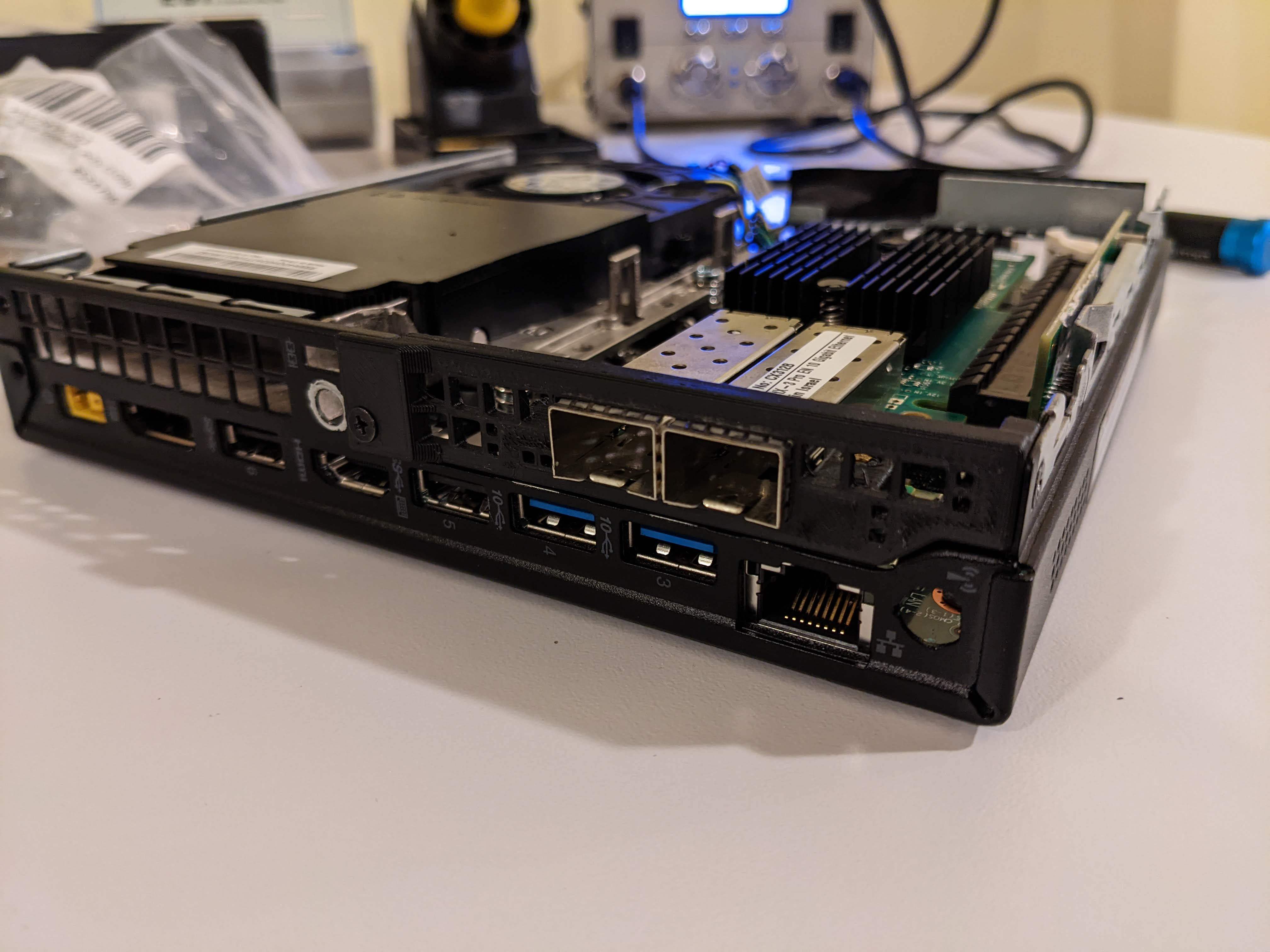
https://www.printables.com/model/413074-m720qm920p-baffle-for-cx312b-pro-connect-x-3-card